

When integrating Sentry into a FastAPI application, especially one that utilizes asynchronous tasks, you might encounter an issue where spans from different tasks are incorrectly nested within each other. This can lead to confusing trace logs and make it difficult to debug performance issues or errors. In this blog post, we'll explore why this happens and how to resolve it using FastAPI's lifespan events.
The Problem: Incorrect Span Nesting in Asynchronous Tasks
When using Sentry's AsyncioIntegration in a FastAPI application, you might notice that spans from concurrent asynchronous tasks appear nested within each other in Sentry's trace logs. Instead of seeing parallel spans representing concurrent execution, you see a nested structure that doesn't reflect the actual flow of your application.
Example of Incorrect Span Nesting:
Trace
├── main (transaction)
    └── test_fn (span)
        └── test_fn (span)
            └── test_fn (span)
                └── test_fn (span)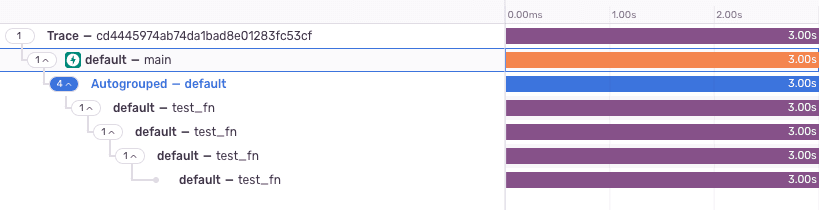
Example of Incorrect Span Nesting
This nesting occurs even though the test_fn functions are running concurrently using asyncio.gather().
Understanding the Cause
The root of the issue lies in when and where you initialize the Sentry SDK with AsyncioIntegration.
Event Loop Availability
- Before Event Loop Starts: If you initialize Sentry at the module level (top-level of your script), the event loop hasn't started yet. As a result, AsyncioIntegration can't properly hook into the event loop.
- After Event Loop Starts: Initializing Sentry after the event loop has started allows AsyncioIntegration to integrate correctly, ensuring proper context propagation across asynchronous tasks.
Context Propagation
Sentry uses context variables to keep track of the current active span or transaction. If these context variables aren't correctly managed due to improper initialization, spans from different tasks can become nested incorrectly because they share the same context.
The Solution: Initialize Sentry After the Event Loop Starts
To fix the incorrect span nesting, you need to ensure that Sentry is initialized after the event loop has started. In FastAPI, the recommended way to do this is by using lifespan events.
Using Lifespan Events in FastAPI
FastAPI provides a way to define startup and shutdown events using a lifespan context manager. This approach ensures that your initialization code runs after the event loop has started.
Step-by-Step Guide:
- Import Required Modules:
from contextlib import asynccontextmanager
from fastapi import FastAPI
import sentry_sdk
from sentry_sdk.integrations.fastapi import FastApiIntegration
from sentry_sdk.integrations.asyncio import AsyncioIntegration- Define the Lifespan Context Manager:
@asynccontextmanager
async def lifespan(app: FastAPI):
    # Startup code
    init_sentry()
    yield
# Shutdown code (if needed)- Initialize Sentry in the Lifespan Function:
def init_sentry():
    sentry_sdk.init(
        dsn="your_sentry_dsn",
        traces_sample_rate=1.0,
        send_default_pii=True,
        integrations=[
            FastApiIntegration(),
            AsyncioIntegration(),
        ],
)- Create the FastAPI App with Lifespan:
app = FastAPI(lifespan=lifespan)- Define Your Routes and Handlers:
@app.get("/")
async def root():
    return {"message": "Hello, World!"}

@app.get("/process")
async def process():
    # Your asynchronous processing logic
    await some_async_function()
    return {"status": "Completed"}
Complete Example:
from contextlib import asynccontextmanager
from fastapi import FastAPI
import sentry_sdk
from sentry_sdk.integrations.fastapi import FastApiIntegration
from sentry_sdk.integrations.asyncio import AsyncioIntegration

def init_sentry():
    sentry_sdk.init(
        dsn="your_sentry_dsn",
        traces_sample_rate=1.0,
        send_default_pii=True,
        integrations=[
            FastApiIntegration(),
            AsyncioIntegration(),
        ],
    )

@asynccontextmanager
async def lifespan(app: FastAPI):
    # Startup code
    init_sentry()
    yield
    # Shutdown code (if needed)

app = FastAPI(lifespan=lifespan)

@app.get("/")
async def root():
    return {"message": "Hello, World!"}

@app.get("/process")
async def process():
    # Your asynchronous processing logic
    await some_async_function()
    return {"status": "Completed"}
Why This Works
- Event Loop Availability: By initializing Sentry inside the lifespan context manager, you ensure that the event loop is already running when AsyncioIntegration initializes.
- Proper Context Management: AsyncioIntegration can now correctly manage context variables across asynchronous tasks, preventing spans from being incorrectly nested.
- Compliance with FastAPI's Recommendations: Using lifespan events aligns with the latest best practices in FastAPI, as
@app.on_event("startup")is deprecated.
Testing the Solution
After implementing the changes, test your application to ensure that spans are correctly represented in Sentry.
- Run Your FastAPI Application:
uvicorn main:app --reload- Make Requests to Trigger Asynchronous Tasks:
curl http://localhost:8000/process- Check Sentry for Traces:
- Log in to your Sentry dashboard.
- Navigate to the Performance or Transactions section.
- Verify that spans are no longer incorrectly nested and reflect the actual concurrent execution.
Example of Correct Span Representation:
Trace
├── main (transaction)
    ├── test_fn (span)
    ├── test_fn (span)
    ├── test_fn (span)
    └── test_fn (span)
Example of Correct Span Nesting
Additional Tips
- Avoid Module-Level Initialization: Do not initialize Sentry at the module level in FastAPI applications.
- Use AsyncioIntegration: Ensure that AsyncioIntegration is included in your integrations list.
- Check for Deprecations: Keep an eye on FastAPI's documentation for any changes in recommended practices.
Conclusion
Incorrect span nesting in Sentry when using FastAPI with asynchronous tasks can be a tricky issue to diagnose. By initializing Sentry after the event loop has started using FastAPI's lifespan events, you can ensure that AsyncioIntegration works correctly, providing accurate tracing information.